
Placing an ARC Electronic Work Order
JA Staff print from the SF Hooper location
Go to e-arc.com (this link will send your files directly to the Hooper location)
Enter the JA account number 22620
Note the job code
Upload the files to be printed / copied / bound
Enter print and delivery instructions and submit order
For questions contact sanfrancisco@e-arc.com or call (415) 495-8700
Scheduling a Silver Bullet Pickup
Go to silverbulletexpress.com
Login with username jensenarch
Password: 30113
Note the job code
Enter the pick up and drop off instructions and submit order
For questions contact (415) 777-5100
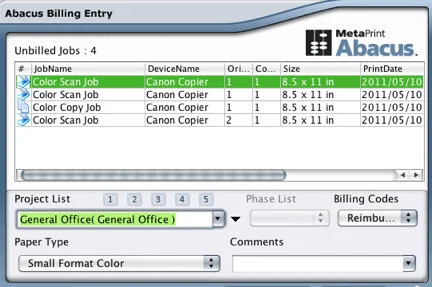
Abacus Print Tracking
After printing, the abacus window will pop up on your personal workstation (alert OM if not).
Highlight the job name you wish to bill from the unbilled jobs list at the top of the window.
On section marked Project List, select from the name on the list using the scroll feature or type the name of a project and then select it when it pops up.
On the Billing Codes toolbar, make sure Reimbursable is selected.
On the Paper Type toolbar: Select the type of B&W or Color from the pull down menu.
Shipping Services

Username: Jensen833
Password: Ask OM

Account #: 3732-9412-8
Username: Jensen833

Account #: 43R25R